The answer is somewhere.
Who are the directors? Which company holds the shares? The information exists, but finding it means moving between spreadsheets, folders and email threads.
ENTITY & GOVERNANCE OS yellow3 Lab
YOUR AI COMPANY SECRETARY
For family offices, holding groups and law firms
An AI company secretary that works from your own records. Ask about ownership and directors, prepare governance documents for review and get ready for filing deadlines, with sources you can inspect.
Entity & Governance OS connects the records and the work behind every company you manage.
Existing English video · English captions available
Lisa explains why company administration becomes difficult when ownership records, directors, documents and deadlines are spread across spreadsheets, folders and emails. She introduces the connected workspace and its built-in AI company secretary: questions answered from company records with references, drafts prepared for review, and filing packs that identify what is available and what still needs attention.
THE WORK BEHIND THE QUESTION
When you manage several entities, finding an answer is only the start. You also need the supporting record, the current version and a clear account of what still needs checking.
Who are the directors? Which company holds the shares? The information exists, but finding it means moving between spreadsheets, folders and email threads.
Preparing a resolution means locating the right appointments, ownership details and governing documents, then checking what has changed.
Filing dates, outstanding information and decision history can become difficult to follow when responsibilities change or a colleague is unavailable.
THE AI COMPANY SECRETARY AT WORK
The secretary brings the information on file into the task at hand. Your team checks the sources, reviews the draft and makes the decision.
Illustrative requests and outputs. These explain the workflow; they are not live AI results.
Ask about the companies, appointments and ownership recorded in your workspace. The secretary provides answers from your records with numbered citations, so you can inspect the supporting source. If information is missing, it should be made explicit.
The source remains part of the answer. Your team checks that the underlying records are accurate and current.
YOUR AI COMPANY SECRETARY
“Who are the directors of Northwind Holdings, and which records support those appointments?”
What the work produces
Describe the decision or document you need. The secretary uses the appointments, ownership and governing documents held on file to prepare a draft for professional review, rather than requiring your team to assemble every detail again.
Prepare resolutions, written consents, minutes, officer’s certificates and powers of attorney for review. Discuss the jurisdictions and document types your team needs.
YOUR AI COMPANY SECRETARY
“Prepare a draft board resolution for appointing a director, using the company records on file.”
What the work produces
Use the filing records and information already held to prepare for upcoming work. The secretary helps assemble a filing pack, identifies outstanding information and prepares a short cover note for the signatory.
Preparation supports your team. It does not mean a filing has been submitted, a deadline has been met or compliance has been established.
YOUR AI COMPANY SECRETARY
“Prepare a filing pack for the next deadline. What do we already hold, and what must we confirm?”
What the work produces
TRY THE FULL PLATFORM
Use the full Entity & Governance OS platform with demo data, including the AI company secretary. Ask questions, prepare drafts and explore the company register, ownership structure, filing calendar and documents. Test the functions and see how the work connects.
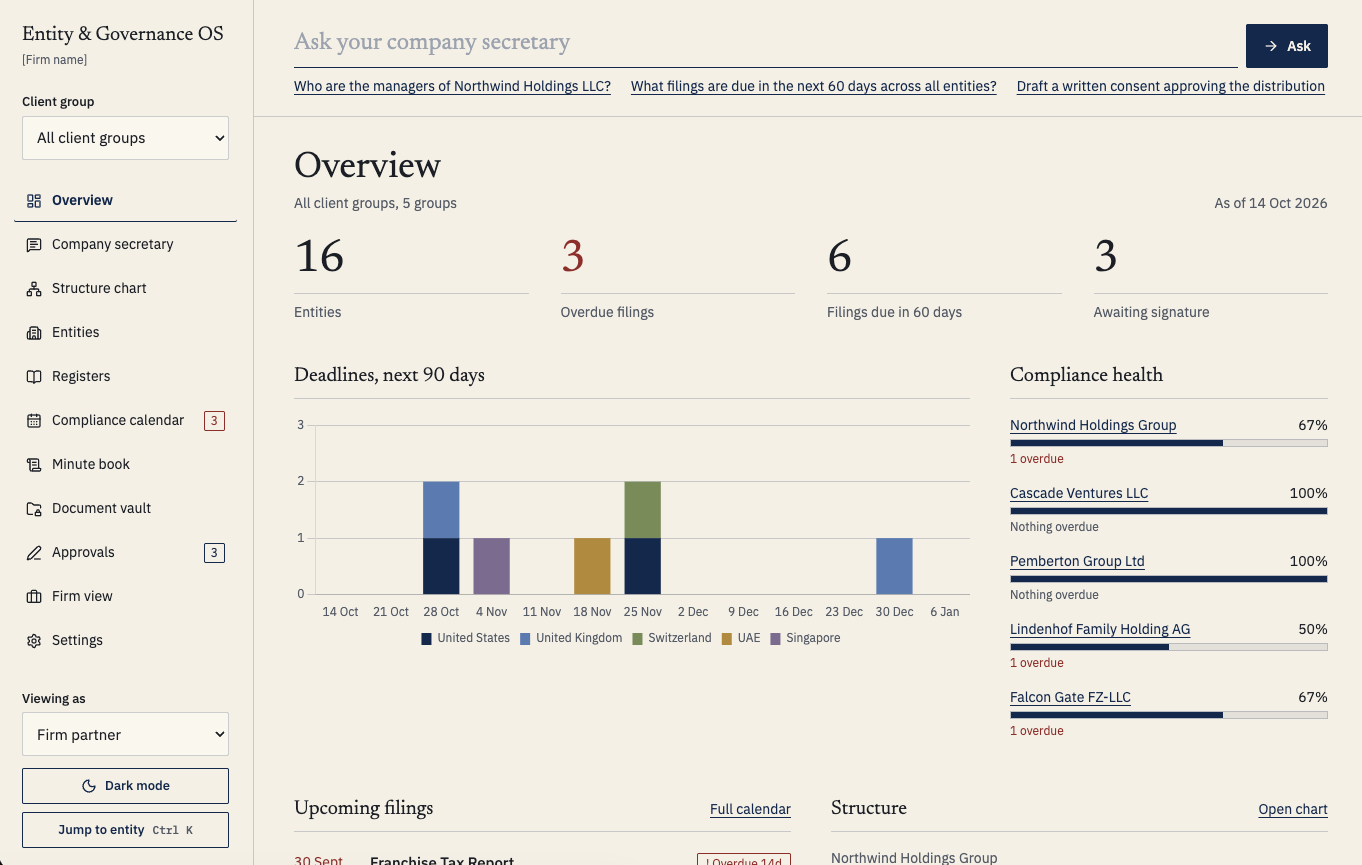 Open the full platform ↗
Open the platform in a separate tab to test it with demo data, including AI.
THE RECORDS THAT MAKE THE SECRETARY USEFUL
The AI company secretary works within a workspace for company records, ownership, deadlines, documents and decisions. The supporting platform gives the information a home and the work a traceable history.
Legal form, jurisdiction, registration details, registered agents, directors and officers.
Ownership records and a structure chart to follow the relationships between entities.
Upcoming and overdue work across the group, with preparation linked to the relevant company.
Governance records, document versions and executed copies kept with the company.
Resolutions, approval steps and signing history connected to the supporting records.
Record-based answers, document drafts and filing preparation within the same workspace.
BUILT FOR THE PEOPLE RESPONSIBLE
A group can span holding companies, operating entities and several jurisdictions. Your team needs to understand the structure and keep the records behind it usable.
Partners, company secretaries and paralegals need to move from a client question to a supported answer or reviewable document.
Everyone authorised to use the same platform can view its records. Separate confidential client records require separate customer platforms. This is not a client portal with confidential access partitions inside one shared workspace.
PROFESSIONAL JUDGEMENT STAYS WITH YOUR TEAM
For professional use, understanding the boundaries matters as much as understanding the capabilities.
The secretary answers from your company records with citations. A reference lets you inspect the source; it does not establish that an old or incomplete record is correct.
Your team checks the facts, jurisdiction and suitability of a document before approval or signature. The platform supports the work and does not replace legal or professional advice.
Each customer has a separate platform. Sign-in is required, access can be restricted to invited users, and administrators can control changes to designated records. All authorised users can view the platform’s records.
Discuss the jurisdictions, document types, confidentiality requirements and working practices you need. Review the relevant data and security documentation before deciding whether the platform is suitable.
YOUR MANAGED PLATFORM
Existing English video · English captions available
Pietro explains the managed platform subscription and the optional Outcome Operator service. Hosting, maintenance and updates are part of the managed platform. When a business needs a specific change, the desired outcome, scope, fixed price and delivery date are agreed separately. The customer reviews and approves the result before it goes live.
The company secretary is part of a managed business platform. yellow3 Lab takes care of hosting, maintenance, updates and the technology behind it.
Hosting, maintenance and updates are managed by yellow3 Lab, so your team can focus on its companies, clients and decisions.
Need a different approval step, a changed workflow or a new service? Explain what you want to accomplish. We help define the outcome and agree the scope, fixed price and delivery date. You review and approve the change before it goes live. Business-specific changes are handled separately from the platform subscription.
BEFORE YOU DECIDE
A clear view of the current offer, including its practical limits.
Entity & Governance OS is a managed company governance platform with a built-in AI company secretary for family offices, holding groups and law firms. It connects company records, ownership, filing deadlines, documents and decisions.
Yes. The full platform is available with demo data, including AI, so you can test the functions and see them work. If you buy, your platform comes clean and ready for your own data.
The offer combines the entity and governance workspace with the built-in AI company secretary and a managed platform service. It covers company records, ownership, deadlines, documents, decisions and preparation work. Confirm the commercial package and required capabilities with yellow3 Lab before subscribing.
Company information and documents are added through the platform’s forms. Records are entered individually so they can be checked while the register is established. Bulk spreadsheet importing is not currently available. Discuss the amount and condition of your existing records before planning the setup.
The current platform is not designed to give different clients access to separate confidential records within one workspace. Everyone authorised to use that platform can view its records. Separate confidential client records require separate customer platforms.
Drafting is jurisdiction-specific and requires professional review. Before subscribing, confirm the countries, company forms, document types and filing work you need with yellow3 Lab. Coverage should be assessed against your actual requirements.
Review the proposed access arrangements and the relevant documentation for your requirements, including data handling, hosting, retention, backup and AI processing. Establish these details before purchase so your team can assess the platform against its confidentiality and professional obligations.
Commercial plans, including subscription options and additional services, are still being finalised. Contact yellow3 Lab to discuss your requirements. Business-specific changes through Outcome Operator are scoped and priced separately.
Yes. You can use the full platform with demo data, including the AI company secretary, to test its functions and see how it works. If you buy, you receive a clean platform, ready for your own company information and documents.
Your team remains responsible for professional review, decisions and the work it approves. The platform supports records and workflows. It does not guarantee legal compliance or replace professional advice.
START WITH THE WORK YOU NEED TO DO
Tell us about the companies you manage, the questions you need to answer and the documents your team prepares. We can discuss whether Entity & Governance OS fits that work.
Full platform with demo data, including AI. When you buy, your platform comes clean, ready for your own data.